15 August AI Photo Editing Prompt ” जैसा कि आप लोग जानते हैं, हर साल 15 अगस्त यानी कि स्वतंत्रता दिवस के मौके पर सोशल मीडिया पर देशभक्ति से भरे AI पोस्टर काफी ट्रेंड करते हैं। अगर आप भी चाहते हैं कि इस हर बार आपकी नॉर्मल फोटो एक प्रोफेशनल Independence Day पोस्टर में बदल जाये, तो इसके लिये न तो आपको Photoshop की जरूरत है और न ही किसी डिजाइनिंग स्किल की।
इस पोस्ट में आपको बहुतसे original 15 August AI Photo Editing Prompts मिलेंगे, जिन्हें आप अपनी जरूरत के अनुसार इस्तेमाल कर सकते हैं। इन prompts को ChatGPT, Gemini या किसी ऐसे AI image generator में try किया जा सकता है जो image editing और generation support करता है।
आप बस नीचे दिये गए प्रॉम्प्ट को कॉपी करके Google Gemini, ChatGPT या किसी भी AI इमेज जनरेटर टूल में जाकर एक शानदार 15 अगस्त पोस्टर बना सकते हैं, वो भी बिल्कुल हाई क्वालिटी में।
10 Work From Home Side Hustles
15 August AI Photo Editing Prompt क्या है?
15 August AI Photo Editing Prompt एक ऐसा detailed instruction होता है जिसे AI image tool को दिया जाता है ताकि आपकी फोटो को Independence Day theme के अनुसार edit या फिर transform किया जा सके।
आप prompt में background, कपड़े, lighting, Indian flag, poster design, camera effect, patriotic atmosphere और image ratio जैसी चीजों को specify कर सकते हैं।
उदाहरण के लिये, आप AI को बता सकते हैं कि आपकी फोटो के पीछे तिरंगा दिखाई दे, background में लाल किला जैसा patriotic environment हो और पूरी image cinematic poster की तरह दिखाई दे। इसका सबसे बड़ा फायदा यह है कि आपको हर चीज manually edit करने की आवश्यकता नहीं होती।
10 AI Side Hustles। जो घर बैठे कमाई शुरू करने में मदद कर सकते हैं
15 अगस्त AI फोटो एडिटिंग प्रॉम्प्ट
नीचे दिए गए 15 August AI Photo Editing Prompt को कॉपी करके अपनी फोटो के साथ किसी भी AI इमेज जनरेटर में पेस्ट करें।
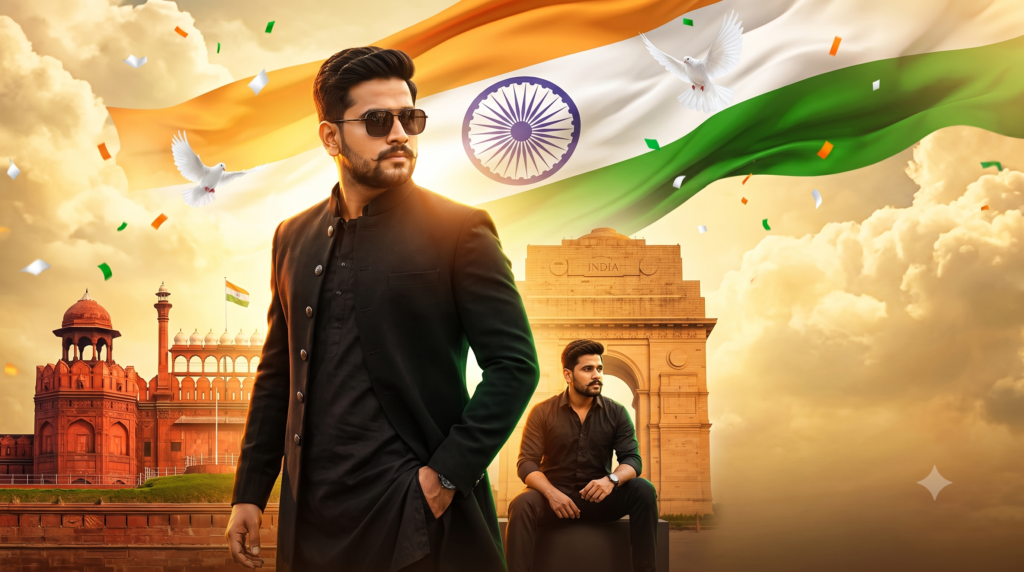
🔥 Prompt 1 — Royal Black Outfit + Standing Hero Pose
Create a high-end cinematic Independence Day poster using the uploaded photo as the main identity reference. Preserve the person's exact recognizable facial identity, natural facial structure, hairstyle and realistic skin texture.

Show the person in the foreground wearing a premium black designer shirt with a sophisticated, stylish appearance. Give him a powerful standing hero pose, body slightly turned toward the camera, one hand inside the trouser pocket and the other hand relaxed naturally. His chin should be slightly raised with a confident and calm expression.

Behind him, create a huge Indian tricolor flag flowing dramatically across the entire upper background. Add subtle patriotic light rays, golden sunset clouds, flying white doves and small tricolor particles.

Create a grand Indian historical atmosphere in the lower background with elegant silhouettes of Red Fort, India Gate and other Indian architectural landmarks. Use dramatic orange, white and green lighting with cinematic depth.

Place the main portrait large on the left side and keep the right side visually clean for a large Independence Day headline.

Premium movie poster composition, dramatic low-angle photography, 85mm lens, realistic skin, sharp eyes, detailed clothing, cinematic shadows, golden rim light, atmospheric haze, high contrast, ultra-realistic, professional Indian poster design.

Vertical 4:5 composition, premium social media poster.
🔥 Prompt 2 — Sitting Stylish Pose
Create a premium cinematic 15 August Independence Day poster using the uploaded photograph as the identity reference. Keep the person's recognizable face, natural facial features and realistic skin texture unchanged.

Show the subject sitting confidently on a stylish modern platform in the foreground. One leg slightly forward, one arm resting naturally on the knee and the other hand relaxed. Give the subject a fashionable confident expression while looking directly toward the camera.

Dress the subject in an elegant black shirt, black trousers and a premium wristwatch. Add stylish sunglasses with realistic reflections.

Create a giant Indian tricolor flag as the main background element. Add Red Fort architecture on the left side, India Gate inspired architecture in the middle distance and warm golden sunlight breaking through dramatic clouds.

Add several white doves flying around the flag and subtle orange, white and green particles floating through the scene.

Keep the subject large in the lower-left foreground while reserving the upper-right and right side for bold Independence Day typography.

Cinematic Bollywood movie poster aesthetic, dramatic lighting, realistic shadows, 85mm portrait photography, shallow depth of field, premium color grading, ultra-realistic face, detailed clothing, HDR, high detail, professional graphic composition.
🔥 Prompt 3 — Walking Toward Camera
Transform the uploaded portrait into an epic cinematic Independence Day poster while preserving the person's exact recognizable identity.

Show the subject walking confidently toward the camera in a stylish black outfit. One foot naturally ahead of the other, one hand adjusting the jacket collar and the other hand relaxed beside the body. Give the subject a powerful cinematic expression and direct eye contact.

Use a low-angle camera perspective to make the subject appear confident and heroic.

Create a huge flowing Indian tricolor flag behind the subject covering the upper half of the composition. Add dramatic golden sunlight, clouds, subtle smoke and realistic atmospheric depth.

In the background, include elegant Indian monuments with Red Fort and India Gate inspired architecture. Add white doves flying around the flag and small tricolor confetti particles.

Make the main subject occupy the left 55 percent of the poster and leave the right side open for large "15 AUGUST" typography.

High-budget Indian patriotic movie poster, cinematic lighting, golden rim light, realistic skin pores, detailed hair, sharp eyes, premium fashion photography, 85mm lens, dramatic shadows, photorealistic, ultra detailed.
😎 Prompt 4 — Sunglasses + Motorcycle Cinematic Look
Create a stylish cinematic Independence Day poster using the uploaded photo as the exact identity reference.

Show the subject standing beside a premium black motorcycle with a confident fashion-model pose. One hand resting naturally on the motorcycle handle and the other hand inside the pocket. The subject is wearing stylish black sunglasses, a premium black outfit and a luxury wristwatch.

Keep the person's original recognizable face and realistic body proportions.

Place a giant Indian tricolor flag flowing behind the subject. Create a dramatic sunset sky with orange clouds, golden sunlight and subtle green atmospheric lighting.

Add an elegant Indian monument silhouette in the distant background along with flying doves and small tricolor celebration particles.

Use a cinematic low-angle camera shot with strong foreground-background separation. The motorcycle and subject should look realistic and premium.

Leave the right side of the poster clean for large Independence Day text.

Luxury fashion campaign + Indian patriotic movie poster aesthetic, ultra-realistic photography, cinematic color grading, realistic reflections, dramatic lighting, high detail, 85mm lens, HDR, premium composition.
🇮🇳 Prompt 5 — White Kurta Royal Patriotic Look
Create a grand royal Independence Day poster from the uploaded photograph. Preserve the person's exact facial identity and natural appearance.

Dress the subject in a premium crisp white kurta with subtle saffron and green detailing. Give the subject a royal confident standing pose with both shoulders relaxed, one hand holding the edge of the kurta naturally and the other hand relaxed.

Place the subject in the center-left foreground.

Create a massive Indian tricolor flag flowing across the sky behind him. Add dramatic golden sunlight from behind the subject, creating a beautiful rim light around the hair and shoulders.

Use a majestic Indian architectural background inspired by historic forts and grand monuments. Add white doves, subtle clouds, golden particles and soft patriotic light effects.

Create a sophisticated premium Independence Day campaign rather than an ordinary photo edit.

Photorealistic face, realistic skin texture, natural eyes, detailed fabric, cinematic shadows, volumetric sunlight, dramatic depth, professional fashion photography, 85mm lens, premium Indian poster design.

Leave large clean space on the right side for Independence Day typography.
🔥 Prompt 6 — Close-Up Cinematic Face + Flag
Create an ultra-premium cinematic Independence Day close-up poster using the uploaded photograph as the identity reference.

Make the subject's face the main focus, shown from the chest upward. Preserve the exact recognizable face, facial proportions, natural skin texture, eyes and hairstyle.

Give the subject a serious and confident cinematic expression while looking slightly toward the camera.

Use a stylish black outfit and subtle sunglasses resting naturally on the face.

Create a giant Indian tricolor flag flowing diagonally across the background. Place the Ashoka Chakra elegantly behind the subject without covering the face.

Add warm orange sunlight from one side, soft green rim lighting from the opposite side and a dramatic white glow behind the head.

Add subtle flying doves and atmospheric particles.

Use cinematic portrait photography, 85mm lens, shallow depth of field, realistic skin pores, sharp eyes, detailed hair, dramatic shadows, premium color grading, high dynamic range, photorealistic quality.

Composition should feel like a premium Indian Independence Day film poster. Keep lower-right space available for "15 AUGUST" and "INDEPENDENCE DAY".
🚩 Prompt 7 — Two-Pose Poster Composition
यह वाला आपके द्वारा भेजी गई image की तरह एक बड़ा portrait + एक छोटा अलग pose वाला concept देगा।
Create a professional cinematic Independence Day poster using the uploaded photograph as the identity reference.

Create TWO versions of the same person within one balanced poster composition while preserving the exact recognizable facial identity.

MAIN PORTRAIT:
Place a large close-to-medium portrait of the subject in the foreground on the left side. Give him a confident standing hero pose, slightly turned body, one hand in pocket and direct eye contact. Dress him in a stylish premium black outfit.

SECONDARY PORTRAIT:
Place a smaller full-body version of the same person in the lower-left background, sitting casually on a low platform with one arm resting on the knee and a relaxed cinematic expression.

Do not make the two poses look identical. They should feel like two professional photographs from the same fashion shoot.

Create a giant Indian tricolor flag covering the upper background. Add Indian historical monuments, golden clouds, white doves, Ashoka Chakra details, warm sunlight and subtle tricolor particles.

Keep the right side open and visually clean for large Independence Day typography.

Premium Bollywood movie poster composition, professional fashion photography, cinematic lighting, realistic skin, detailed clothing, natural proportions, dramatic depth, golden rim light, 85mm lens, ultra-realistic, high detail.
👑 Prompt 8 — Luxury Black & Gold Patriotic Poster
Create a luxurious cinematic Independence Day poster from the uploaded photo while preserving the person's exact recognizable identity.

Give the subject an elegant black suit with a subtle tricolor pocket-square detail. Show him standing in a powerful fashion-model pose with one hand adjusting his cuff and the other hand relaxed. His body should be slightly angled and his expression should be confident and sophisticated.

Create a dramatic Indian tricolor flag flowing in the background, but blend it elegantly with a black-and-gold cinematic atmosphere.

Use warm golden sunlight, dark clouds, orange highlights, subtle green rim light and a soft white glow around the subject.

Add a grand Indian monument silhouette in the distance and several white doves flying through the upper background.

Create realistic golden particles and subtle patriotic atmosphere without making the image look overly edited.

Luxury magazine cover meets Indian Independence Day movie poster. Photorealistic face, realistic skin, detailed suit texture, cinematic shadows, dramatic lighting, 85mm lens, shallow depth of field, premium color grading, ultra-high detail.

Place the subject on the left side and leave approximately 40 percent negative space on the right side for large Independence Day typography.
🔥 Prompt 9 — Bike + Sitting + Large Portrait Combo
Create a highly detailed cinematic Independence Day poster using the uploaded image as the exact identity reference.

Create a three-layer poster composition:

1. MAIN PORTRAIT:
A large close-up portrait of the person in the foreground wearing stylish black sunglasses and a premium black outfit, looking confidently toward the camera.

2. SECONDARY POSE:
A smaller version of the same person sitting casually beside a premium black motorcycle, one arm resting naturally on the knee.

3. BACKGROUND:
A huge Indian tricolor flag flowing dramatically across the sky with Red Fort inspired architecture, India Gate inspired monument, golden sunset clouds and flying white doves.

Maintain the same recognizable face across both portraits.

Use dramatic cinematic lighting, golden rim light, realistic shadows, atmospheric haze, tricolor reflections, premium fashion photography, low-angle perspective, 85mm lens, realistic skin texture, detailed hair and clothing.

Make the composition look like a professionally designed Independence Day movie poster rather than a simple photo collage.

Keep the right side clean for bold "15 AUGUST" typography.

Ultra-realistic, cinematic, premium, dramatic, high detail, professional poster composition, vertical 4:5.
💥 Prompt 10 — सबसे ज्यादा Poster जैसा Look
Create an epic high-budget Indian Independence Day cinematic poster using the uploaded photograph as the exact identity reference.

Preserve the person's recognizable facial identity, natural facial structure, realistic skin texture and hairstyle.

Place a large hero portrait of the subject in the foreground, positioned slightly left of center. The subject should wear a stylish black designer outfit and sunglasses. Give him a powerful movie-hero pose with his body turned slightly sideways, one hand inside the pocket and the other hand relaxed naturally.

Behind the main portrait, create a smaller secondary image of the same person sitting confidently in a different pose, creating a premium layered poster composition.

Fill the upper background with a massive realistic Indian tricolor flag flowing through the sky. Add a detailed Ashoka Chakra, dramatic golden clouds, white doves and subtle flying tricolor confetti.

Use Red Fort inspired architecture on the left background and India Gate inspired architecture toward the center-right.

Create strong cinematic golden backlight behind the main subject, orange highlights on one side and subtle green rim lighting on the other side.

Make the entire composition vibrant, dramatic, patriotic and premium without looking artificial.

Professional Indian movie poster, luxury fashion campaign, cinematic photography, low-angle camera, 85mm lens, shallow depth of field, HDR, realistic skin pores, detailed eyes, realistic hair, detailed clothing, dramatic shadows, volumetric lighting, atmospheric haze, premium color grading, ultra-photorealistic, extremely detailed.

Keep approximately 35–40 percent of the right side available for adding large typography such as "15 AUGUST", "INDEPENDENCE DAY" and a short patriotic tagline later.

No distorted face, no duplicate face errors, no extra fingers, no deformed hands, no plastic skin, no cartoon ap
15 August AI Photo कैसे बनाएं?
अब सवाल आता है कि इन 15 August AI Photo Editing Prompt का इस्तेमाल करके photo कैसे तैयार करें? इसके लिए आपको किसी complicated editing software की जरूरत नहीं है।
Step 1: एक अच्छी Photo चुनें
सबसे पहले ऐसी photo चुनें जिसमें आपका चेहरा साफ दिखाई देता हो। बहुत ज्यादा blur, dark या low-resolution photo की जगह अच्छी lighting वाली image इस्तेमाल करें।
Step 2: AI Image Tool खोलें
ऐसे AI platform का इस्तेमाल करें जिसमें image generation या image editing की सुविधा उपलब्ध हो। अपने account में sign in करने के बाद image creation/editing option चुनें।
Step 3: अपनी Photo Upload करें
अब जिस फोटो को Independence Day theme में बदलना चाहते हैं, उसे upload करें।
Step 4: अपना Prompt Paste करें
ऊपर दिये गये 15 August AI Photo Editing Prompt में से अपनी पसंद का prompt copy करके AI tool के prompt box में paste करें। अगर tool आपको additional instructions देने की सुविधा देता है, तो आप image ratio भी बता सकते हैं, जैसे:
- WhatsApp Status के लिए 9:16
- Instagram Post के लिए 4:5
- Square Post के लिए 1:1
Step 5: Image Generate करें
अब Generate/Create button पर क्लिक करें। AI आपके 15 August AI Photo Editing Prompt और uploaded image के आधार पर नया visual तैयार करेगा। अगर पहली image आपकी उम्मीद के अनुसार नहीं आती है, तो prompt में छोटे बदलाव करके दोबारा generate कर सकते हैं।.
Google AI Search Mode Kaise Use Kare
बेहतर AI Photo के लिए जरूरी Tips
अच्छा result पाने के लिए सिर्फ लंबा 15 August AI Photo Editing Prompt लिखना काफी नहीं है। Input photo भी महत्वपूर्ण होती है।
Clear Photo इस्तेमाल करें: चेहरे की details जितनी साफ होंगी, AI के लिए reference उतना बेहतर हो सकता है।
Natural Lighting रखें: बहुत dark या overexposed photo से result कमजोर हो सकता है।
एक ही मुख्य concept रखें: एक prompt में बहुत ज्यादा अलग-अलग चीजें जोड़ने से composition messy हो सकती है।
Text बाद में जोड़ें: कई AI image tools text को गलत लिख सकते हैं। इसलिए poster पर exact heading चाहिए तो image generate करने के बाद Canva या किसी अन्य editor में text जोड़ना बेहतर हो सकता है।
Ratio सही चुनें: Social media के लिए image का aspect ratio पहले तय कर लें।
AI से वेबसाइट की SEO Audit कैसे करें
15 August Photo के लिए कौन-से AI Tools इस्तेमाल कर सकते हैं?
आप अपनी सुविधा और उपलब्ध features के अनुसार अलग-अलग AI image tools इस्सतेमाल कर सकते हैं। उदाहरण के तौर पर ChatGPT और Google Gemini जैसे tools में image-related capabilities उपलब्ध हो सकती हैं। इनके features और availability समय के साथ बदल सकते हैं।
इसके अलावा image editing के लिए ऐसे tools भी उपयोग किए जा सकते हैं जिनमें text-to-image या image-to-image functionality उपलब्ध हो।
Tool चुनते समय इन बातों पर ध्यान दें:
- Image upload support
- Image editing capability
- Output quality
- Aspect ratio options
- Free और paid features
- Commercial-use terms
- Generated images पर watermark
15 August AI Photo Editing Prompt के फायदे
15 August AI Photo Editing Prompt का सबसे बड़ा फायदा यह है कि बिना advanced photo editing knowledge के भी creative Independence Day visuals तैयार किए जा सकते हैं।
इसके कुछ प्रमुख फायदे हैं:
- Photo editing का समय कम हो सकता है।
- अलग-अलग creative concepts आसानी से try किए जा सकते हैं।
- Social media के लिए vertical posters बनाए जा सकते हैं।
- Family और friends की group photos को भी patriotic theme दिया जा सकता है।
- Background और lighting जैसे elements AI की मदद से बदले जा सकते हैं।
- Beginners भी prompt-based editing से शुरुआत कर सकते हैं।
WhatsApp और Instagram के लिए कौन-सा Size रखें?
अलग-अलग platforms के लिए image ratio अलग हो सकता है। सामान्य तौर पर:
| इस्तेमाल | Recommended Ratio |
|---|---|
| WhatsApp Status | 9:16 |
| Instagram Story | 9:16 |
| Instagram Portrait Post | 4:5 |
| Square Social Post | 1:1 |
| Facebook Post | 4:5 या 1:1 |
ध्यान रखें कि exact display size platform के current specifications पर निर्भर कर सकता है।
AI Agent Kya Hai? Complete Guide
AI Photo बनाते समय किन गलतियों से बचें?
AI photo बनाते समय कुछ common mistakes से बचना चाहिये।
बहुत low-quality photo: इससे face और clothing details ठीक से interpret नहीं हो सकतीं।
बहुत complicated prompt: एक ही prompt में जरूरत से ज्यादा objects डालने पर final composition खराब हो सकती है।
गलत text generation: AI से poster text generate करवाने पर spelling mistakes आ सकती हैं। Important text को बाद में manually add करना बेहतर है।
Unnatural face: अगर result में face बदल जाता है, तो prompt में natural identity preservation और realistic facial features पर जोर दें।
अनावश्यक effects: जरूरत से ज्यादा particles, smoke, lens flare या lighting image को artificial बना सकते हैं।
Frequently Asked Questions
1. क्या 15 August AI Photo Editing Prompt free में इस्तेमाल कर सकते हैं?
ऊपर दिए गए prompts original text instructions हैं और इन्हें आप अपने creative image generation workflow में इस्तेमाल कर सकते हैं। हालांकि जिस AI tool का इस्तेमाल करेंगे, उसके free और paid features अलग-अलग हो सकते हैं।
2. क्या अपनी selfie से Independence Day photo बनाई जा सकती है?
हाँ, अगर आपका चुना हुआ AI tool image upload/editing support करता है, तो आप अपनी clear photo को reference के रूप में इस्तेमाल करके Independence Day theme वाला visual बनाने की कोशिश कर सकते हैं।
3. 15 August photo के लिए कौन-सा ratio अच्छा है?
WhatsApp Status और Instagram Story के लिए vertical 9:16 format उपयोगी रहता है, जबकि Instagram portrait post के लिए 4:5 format इस्तेमाल किया जा सकता है।
4. क्या group photo को Independence Day poster में बदल सकते हैं?
हाँ। Group photo के लिए अलग prompt इस्तेमाल करके सभी लोगों को एक ही patriotic environment में रखने की कोशिश की जा सकती है।
5. AI photo में अपना नाम कैसे डालें?
AI-generated image में text गलत आने की संभावना रहती है। इसलिए बेहतर तरीका यह है कि पहले background और portrait generate करें और बाद में Canva या किसी दूसरे image editor में अपना नाम और Independence Day text जोड़ें।
6. क्या AI से बनी photo WhatsApp Status पर लगा सकते हैं?
हाँ, सामान्य तौर पर आप अपने बनाए हुए visual को social media पर share कर सकते हैं। लेकिन किसी AI service की specific terms और किसी दूसरे व्यक्ति की photo/identity के इस्तेमाल से जुड़े अधिकारों का ध्यान रखना चाहिए।
15 August AI Photo Editing Prompt, 15 August AI Photo Editing Prompt, 15 August AI Photo Editing Prompt, 15 August AI Photo Editing Prompt, 15 August AI Photo Editing Prompt, 15 August AI Photo Editing Prompt, 15 August AI Photo Editing Prompt, 15 August AI Photo Editing Prompt,15 August AI Photo Editing Prompt,
निष्कर्ष
अगर आप इस Independence Day पर अपनी normal photo को एक अलग और creative look देना चाहते हैं, तो 15 August AI Photo Editing Prompt एक आसान तरीका हो सकता है।
आपको केवल एक अच्छी quality वाली photo और अपने पसंद का creative prompt चाहिए। इसके बाद AI image tool की मदद से अलग-अलग patriotic concepts try किए जा सकते हैं।
ऊपर दिए गए prompts में cinematic portrait, Tiranga background, Red Fort inspired poster, family photo, friends group, minimalist design और social media portrait जैसे अलग-अलग ideas शामिल हैं।
सबसे अच्छे result के लिए पहले एक simple prompt से शुरुआत करें। अगर image आपकी उम्मीद के अनुसार नहीं आती है, तो background, lighting, pose और image ratio जैसी चीजों को धीरे-धीरे बदलें।
और सबसे जरूरी बात — AI से बनाई गई image को share करने से पहले उसमें मौजूद text, face details और overall composition को एक बार जरूर check करें । आपको 15 August AI Photo Editing Prompt पोस्ट कैसी लगी जरुर बताये।
आप सभी को स्वतंत्रता दिवस की हार्दिक शुभकामनाएं!